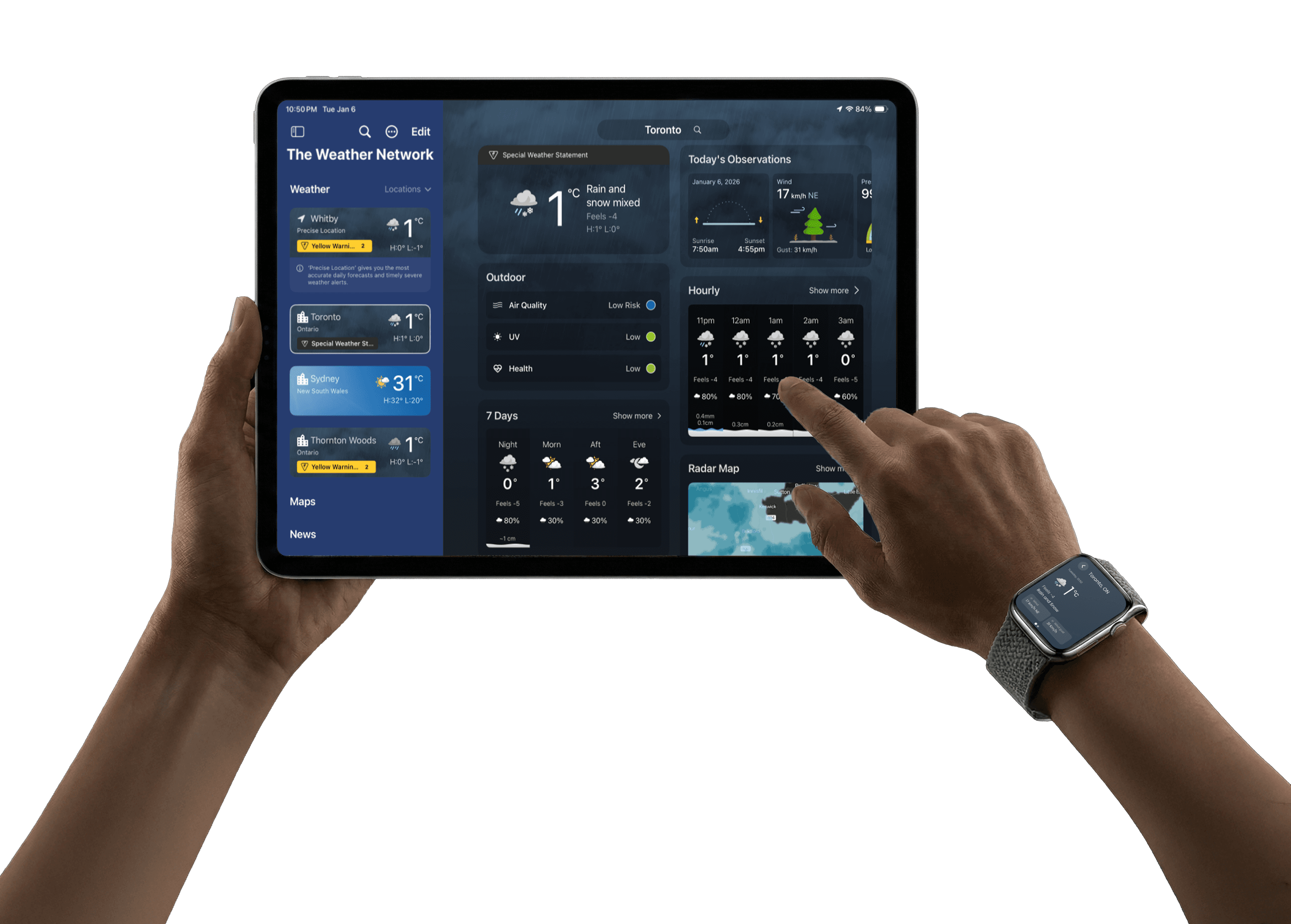
TWN New Surfaces
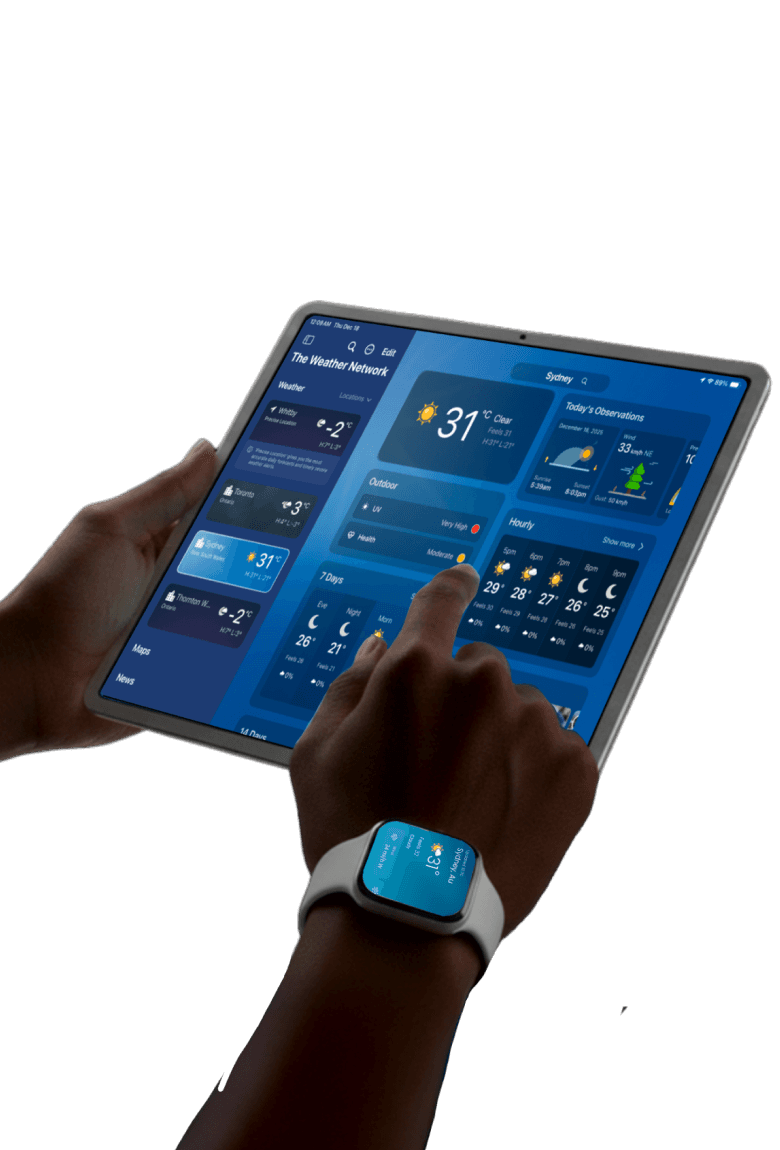
Tablet and watch experiences.
Role
Product Designer
Role
Product Designer
Timeline
6-8 Weeks
Timeline
6-8 Weeks
Impact
35% increase in user retention
Impact
35% increase in user retention
Platform
Tablet & WatchOS
Platform
Tablet & WatchOS
SCROLL
TWN New Surfaces
Tablet and watch experiences.
Role
Product Designer
Timeline
6-8 Weeks
Impact
35% increase in user retention
Platform
Tablet & WatchOS
THE STARTING POINT
01
The Challenge
TWN Canada was a mobile-first product with no presence on Apple Watch or Tablet. Users relied on the iPhone app for both quick checks and deep exploration, creating friction across different moments of use. The challenge was to expand TWN across new platforms without fragmenting the experience or duplicating the mobile app. Each device needed a clear, intentional role
Key Constraints
ONE
Uncharted Territory
No existing Watch or Tablet products, meaning usage patterns, success metrics, and content hierarchy had to be defined from scratch
ONE
Uncharted Territory
No existing Watch or Tablet products, meaning usage patterns, success metrics, and content hierarchy had to be defined from scratch
two
High Frequency
Weather is a high-frequency, time-sensitive utility, leaving little tolerance for friction or learning curves
two
High Frequency
Weather is a high-frequency, time-sensitive utility, leaving little tolerance for friction or learning curves
three
Interaction Constraints
Apple Watch interactions are measured in seconds, requiring extreme prioritization and glance-first design
three
Interaction Constraints
Apple Watch interactions are measured in seconds, requiring extreme prioritization and glance-first design
four
Ecosystem Integrity
Ecosystem IntegrityThe Watch experience needed to support mobile usage rather than replace it, avoiding a standalone product that could dilute core engagement
four
Ecosystem Integrity
Ecosystem IntegrityThe Watch experience needed to support mobile usage rather than replace it, avoiding a standalone product that could dilute core engagement
Goals
02
Defining Success
Align fast, low-friction user moments with a multi-device strategy that grows adoption without fragmenting engagement.
User Goals
Effortless Awareness
Access critical weather information faster and with less effort, especially in time-sensitive moments.
Seamless Escalation
Use Apple Watch for quick awareness and the ability to seamlessly continue on mobile when deeper context is needed.
Dedicated Planning
Use Tablet as a dedicated planning surface for comparing forecasts, locations, and timeframes.
Purpose-Built UI
Experience clear, purpose-built interfaces across devices rather than scaled versions of the mobile app.
Business Goals
Ecosystem Entry Point
Establish Apple Watch as an entry point into the mobile ecosystem, increasing high-intent mobile sessions.
Tablet Habituation
Grow the tablet user base by giving tablet users a compelling reason to return and form habits.
Non-Cannibalized Growth
Increase cross-device usage without cannibalizing core mobile engagement.
Platform Dominance
Strengthen TWN’s position as a multi-device weather platform, not just a mobile app.
MY ROLE
03
What I Owned
Experience Architecture
Designed cross-device interaction flows and information hierarchy for Watch, Mobile and Tablet.
Experience Architecture
Designed cross-device interaction flows and information hierarchy for Watch, Mobile and Tablet.
Platform Design
Created glance-first Watch interfaces and immersive Tablet layouts tailored to platform behaviors.
Platform Design
Created glance-first Watch interfaces and immersive Tablet layouts tailored to platform behaviors.
Visual Design
Applied consistent visual language and interface components across platforms for clarity and usability.
Visual Design
Applied consistent visual language and interface components across platforms for clarity and usability.
Collaboration
Worked closely with Product and Engineering to ensure feasibility and smooth handoff of design solutions.
Collaboration
Worked closely with Product and Engineering to ensure feasibility and smooth handoff of design solutions.
04 The tabLet experience
Tablet is for planning.
Tablet isn’t a bigger phone. It's an atmospheric dashboard.
THE PROBLEM
04 . 1
Stretching the phone feed increased friction
On mobile, vertical feeds work. On tablet, that same pattern breaks the experience: it creates more movement but not more clarity.
Too much vertical travel
Key modules (hourly, radar, alerts) were buried behind long, exhausting scrolls.
Too much vertical travel
Key modules (hourly, radar, alerts) were buried behind long, exhausting scrolls.
Weaker hierarchy
Everything looked the same size. Users had to read more to understand what mattered.
Weaker hierarchy
Everything looked the same size. Users had to read more to understand what mattered.
Context loss
As users scrolled, they lost track of time, location, and orientation within the app.
Context loss
As users scrolled, they lost track of time, location, and orientation within the app.
Poor use of space
Wide layouts behaved like single-column feeds, making the screen feel empty and slow.
Poor use of space
Wide layouts behaved like single-column feeds, making the screen feel empty and slow.
outcome
04 . 1
A dashboard built for scanning.
Instead of scaling up the mobile feed, I redesigned the tablet experience around a scan-first dashboard for instant clarity.
Dashboard structure
Supports scanning across modules horizontally and vertically rather than just reading down.
Dashboard structure
Supports scanning across modules horizontally and vertically rather than just reading down.
Clear grouping
Organized into predictable sections (Now → Next → Later) for a faster mental model.
Clear grouping
Organized into predictable sections (Now → Next → Later) for a faster mental model.
Module priority
Critical data stays prominent; secondary modules stay accessible without competing.
Module priority
Critical data stays prominent; secondary modules stay accessible without competing.
Persistent context
Kept time and location anchored so users never lose orientation while exploring.
Persistent context
Kept time and location anchored so users never lose orientation while exploring.
outcome
04 . 1
Key Features
Scan-first layout, built for tablet.
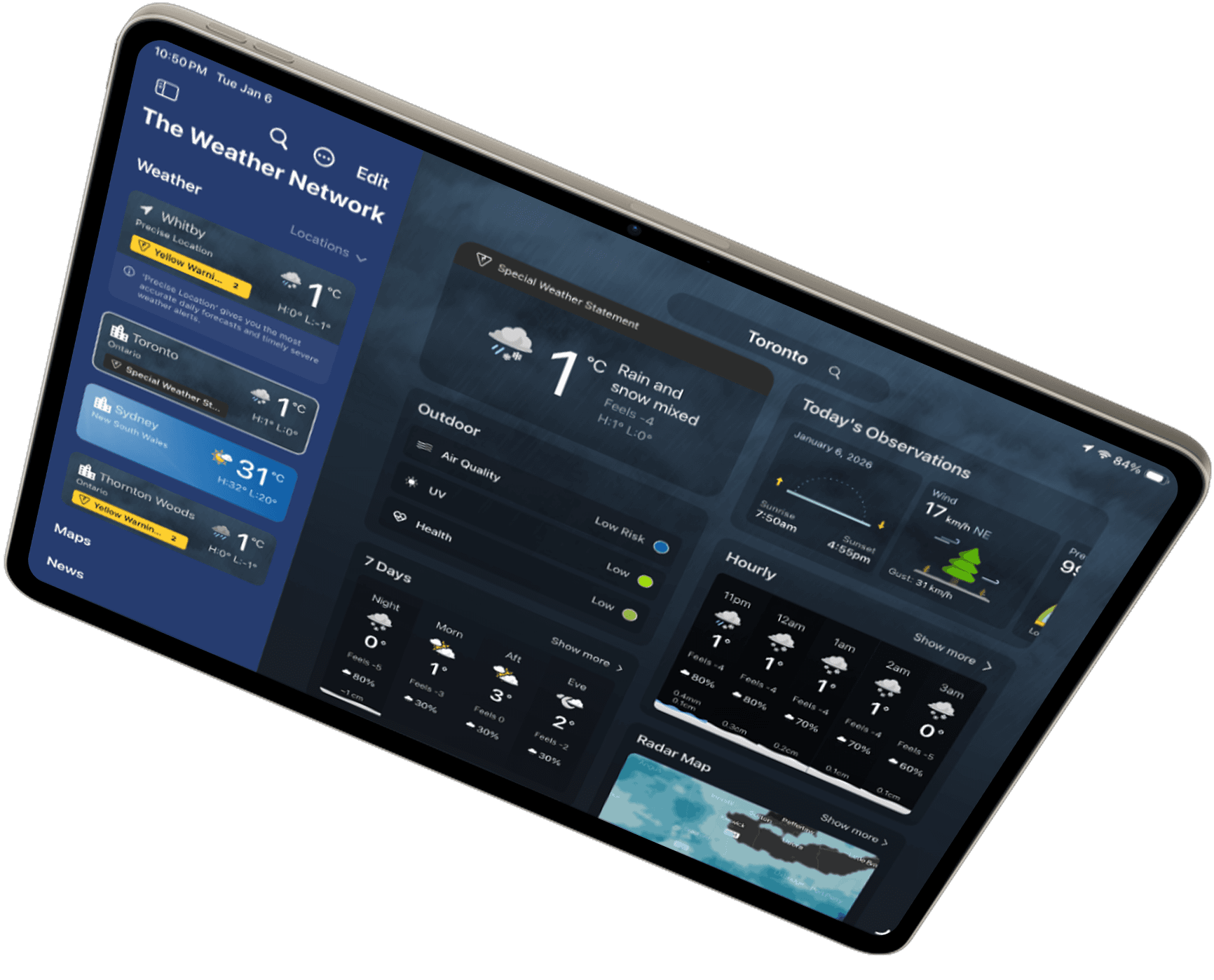
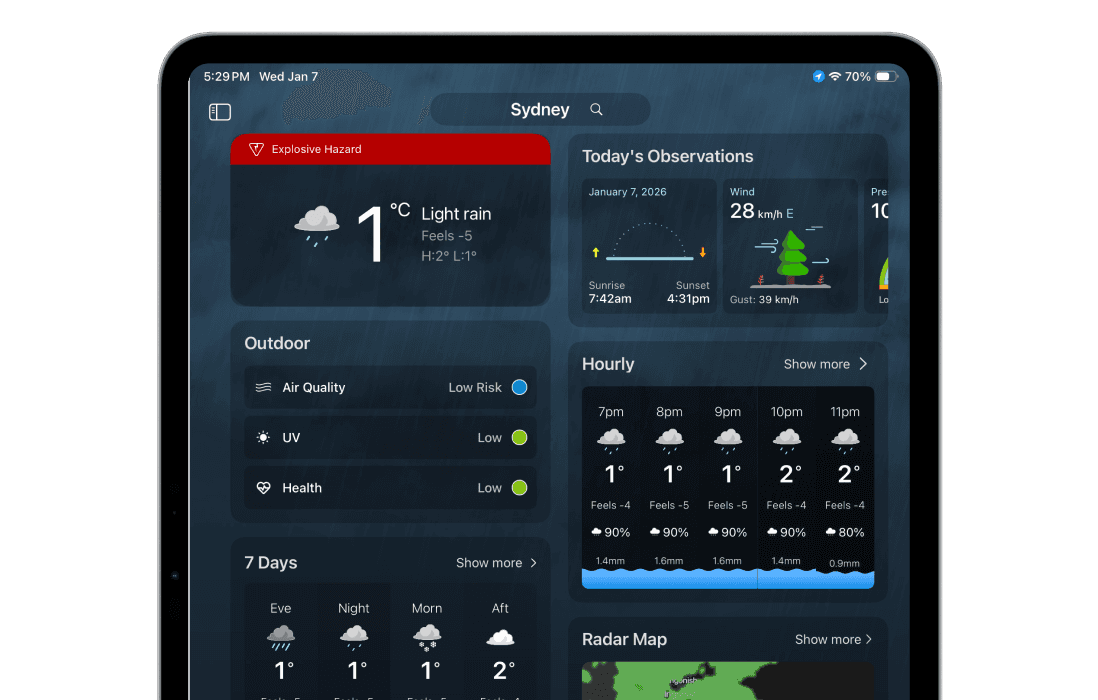
A two-column dashboard in portrait makes the forecast easier to skim. In landscape, the left drawer stays open with the location list—so users can switch places without losing context.
Alerts, always in view.
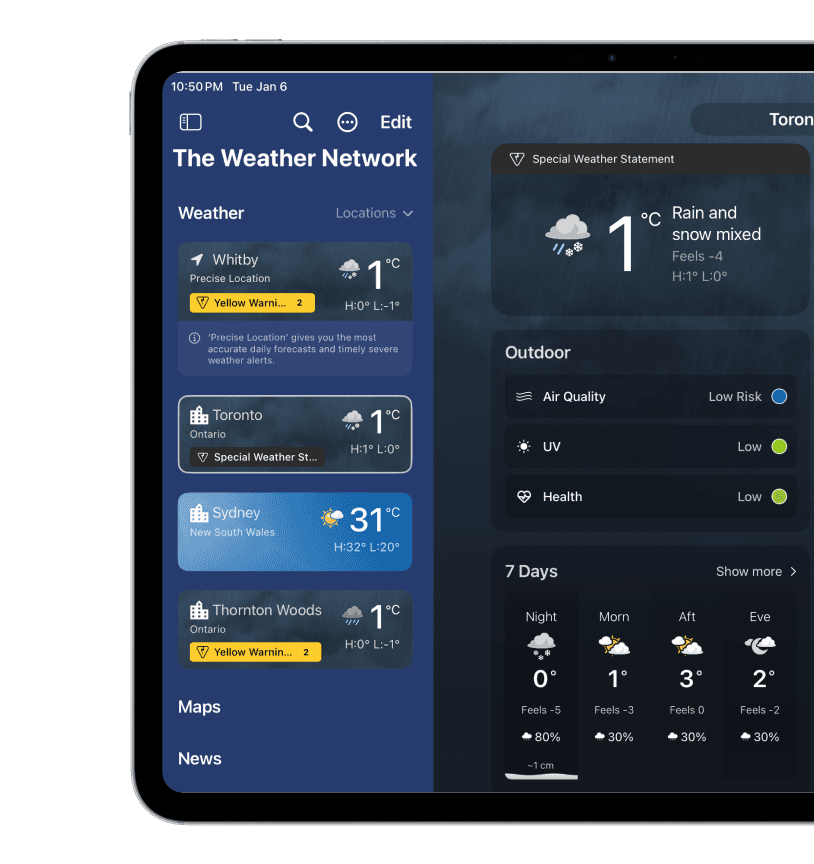
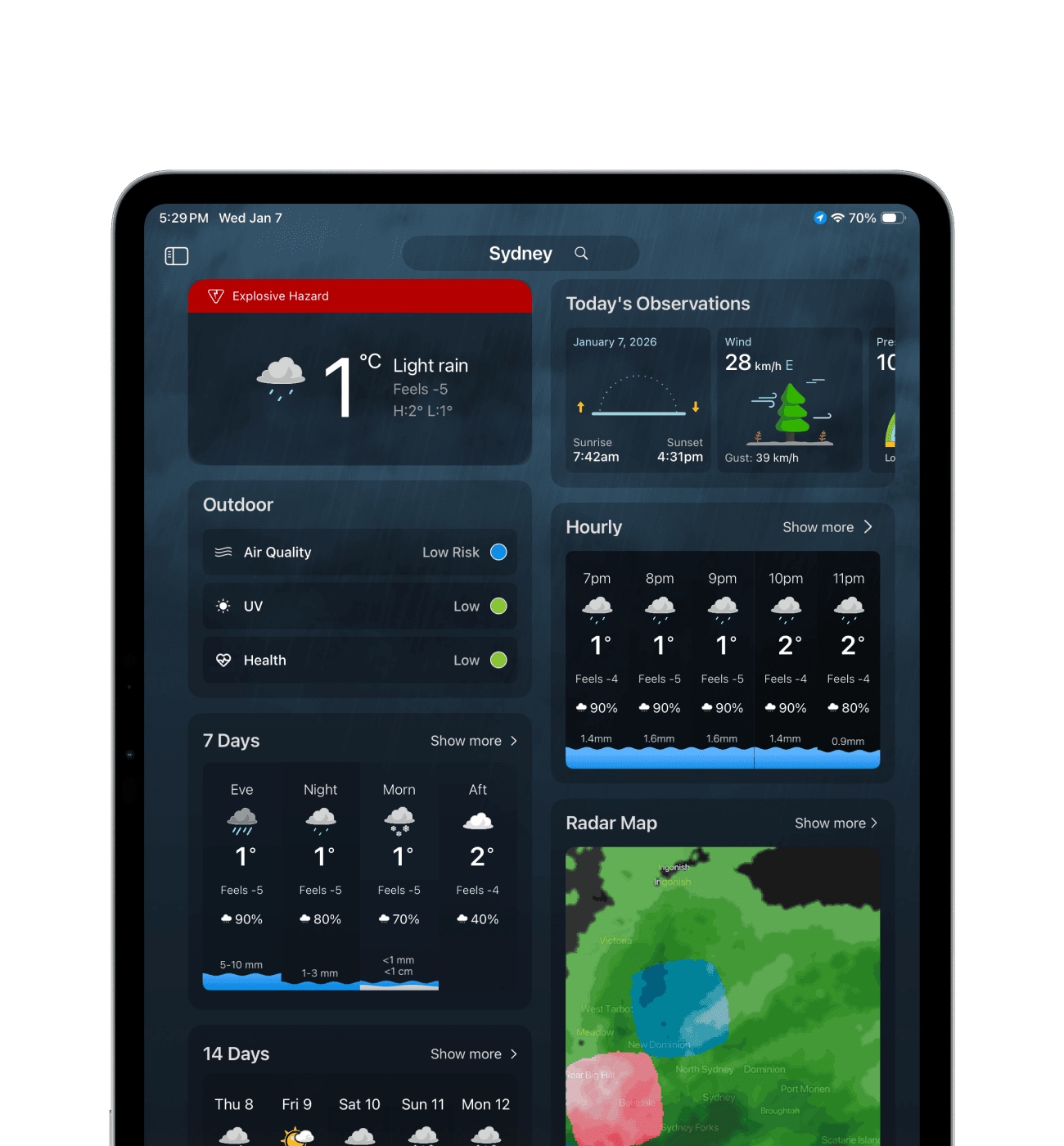
Alerts live inside the location list, so urgency is visible where users already navigate. In landscape, the alert state stays persistent making it easy to monitor conditions while exploring the forecast.
Maps made for the bigger screen.
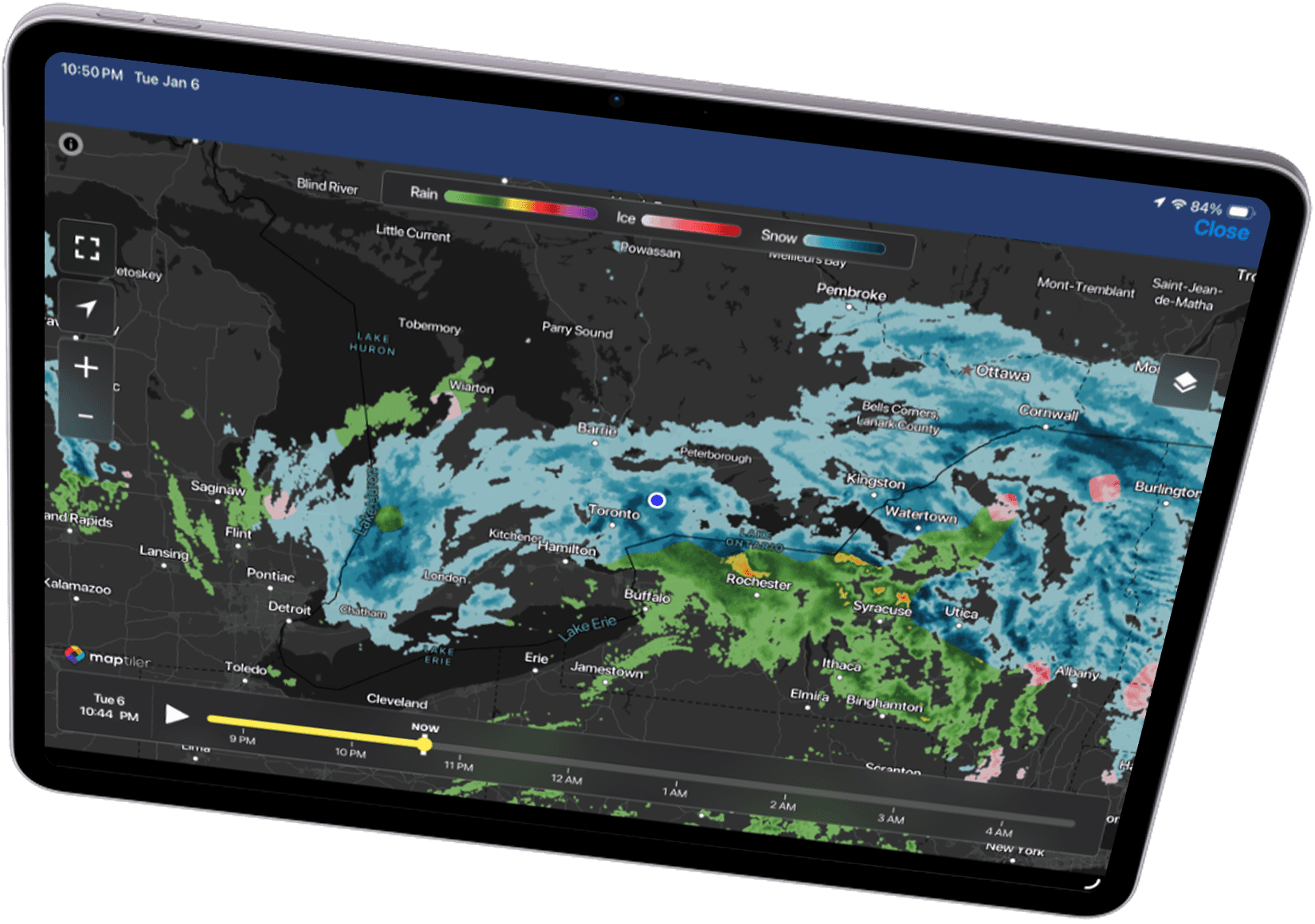
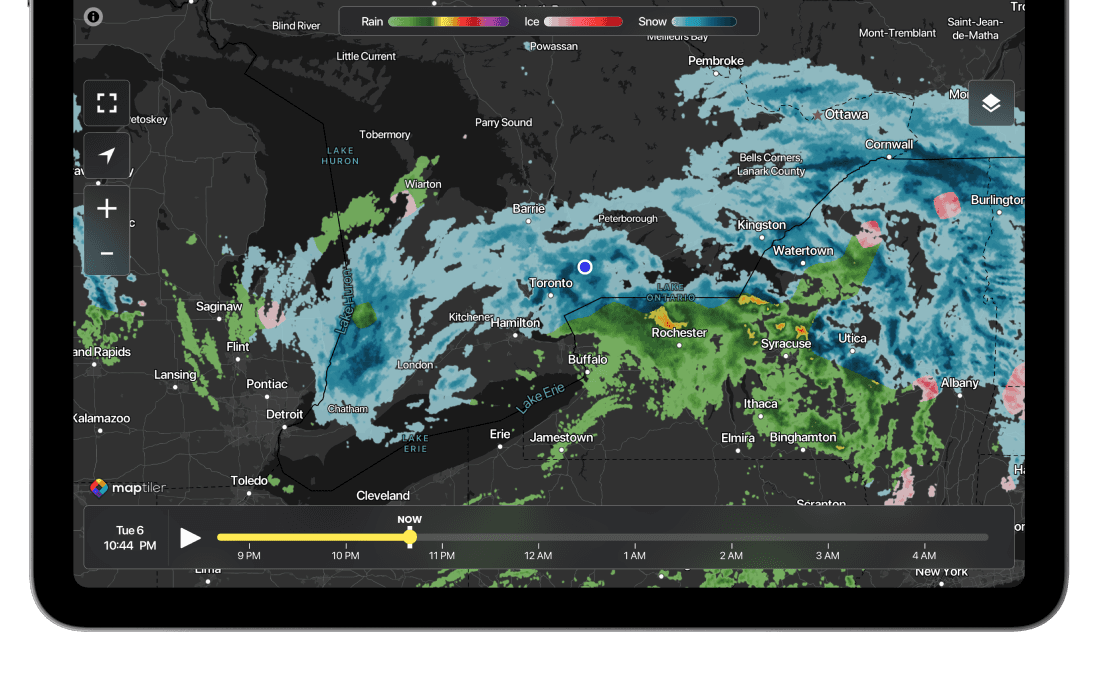
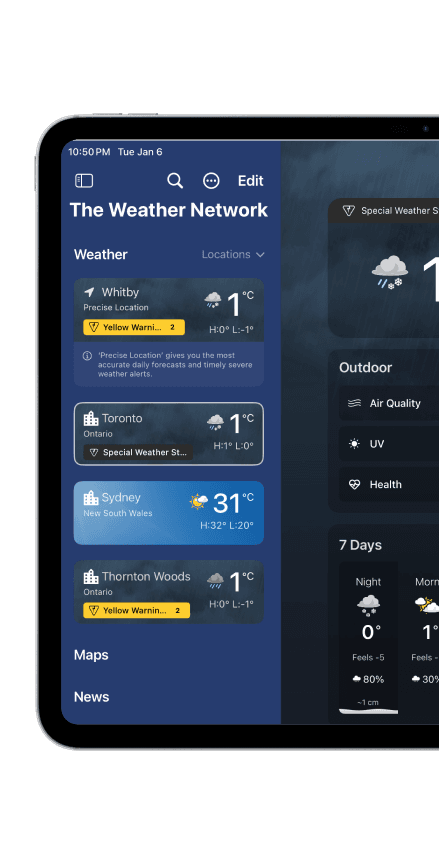
A dedicated maps experience for radar, precipitation, highway conditions, wind, and clouds designed to take advantage of tablet space for clearer layers, quicker scanning, and better situational awareness.
More depth, not more noise.
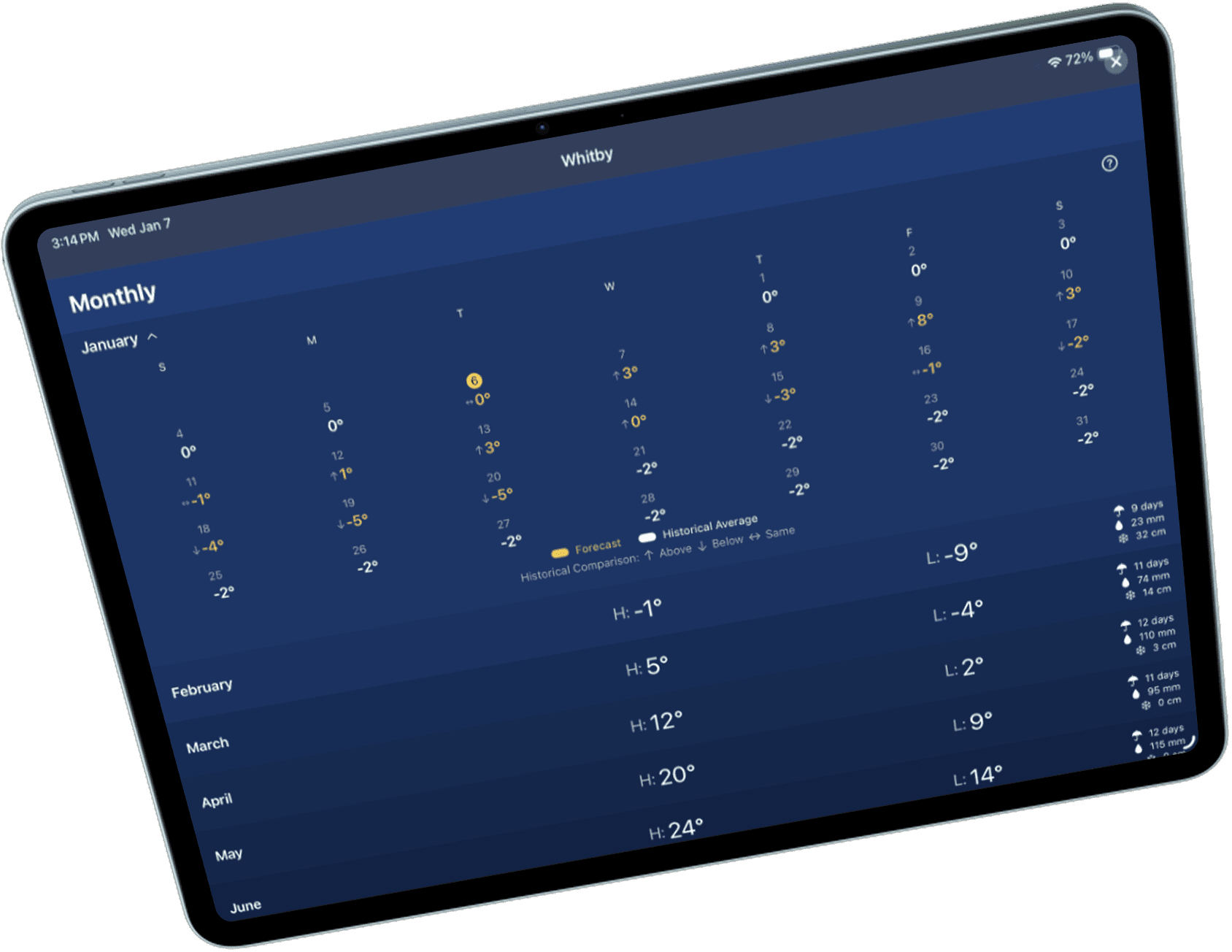
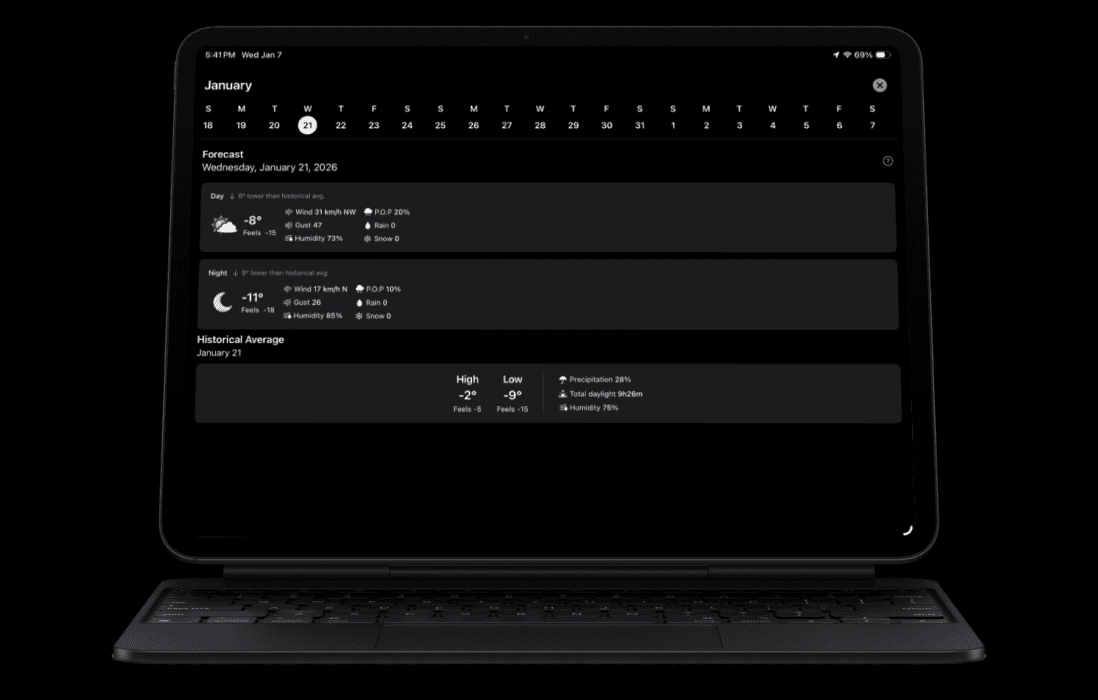
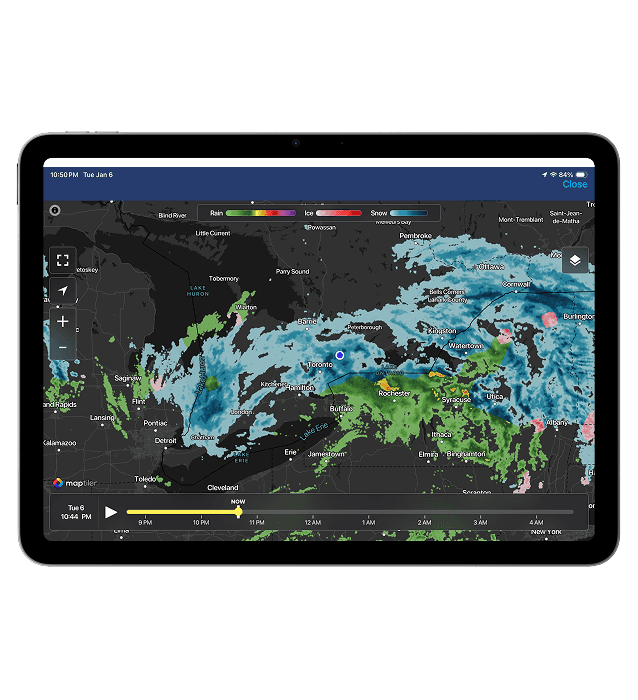
Tablet unlocks a wider, more detailed forecast view showing more of what matters at once while keeping hierarchy clean, readable, and easy to compare across timeframes.
05 The WATCH experience
Watch is for micro-moments
People check watch weather to decide fast not browse.
THE PROBLEM
05 . 1
Watch isn’t a small phone
On watch, attention is limited and sessions are short. If we tried to bring mobile-style richness onto the wrist, the experience would become friction:
Cognitive Overload
Too much reading before getting an answer leads to mental friction.
Cognitive Overload
Too much reading before getting an answer leads to mental friction.
High Interaction Cost
Too many taps for basic questions like “is it going to rain soon?”
High Interaction Cost
Too many taps for basic questions like “is it going to rain soon?”
Information Noise
Important signals competing with nice-to-have data metrics.
Information Noise
Important signals competing with nice-to-have data metrics.
Friction Cycles
If the experience isn’t instant, users won’t build a daily habit.
Friction Cycles
If the experience isn’t instant, users won’t build a daily habit.
outcome
05 . 2
A glance-first watch experience (built from scratch)
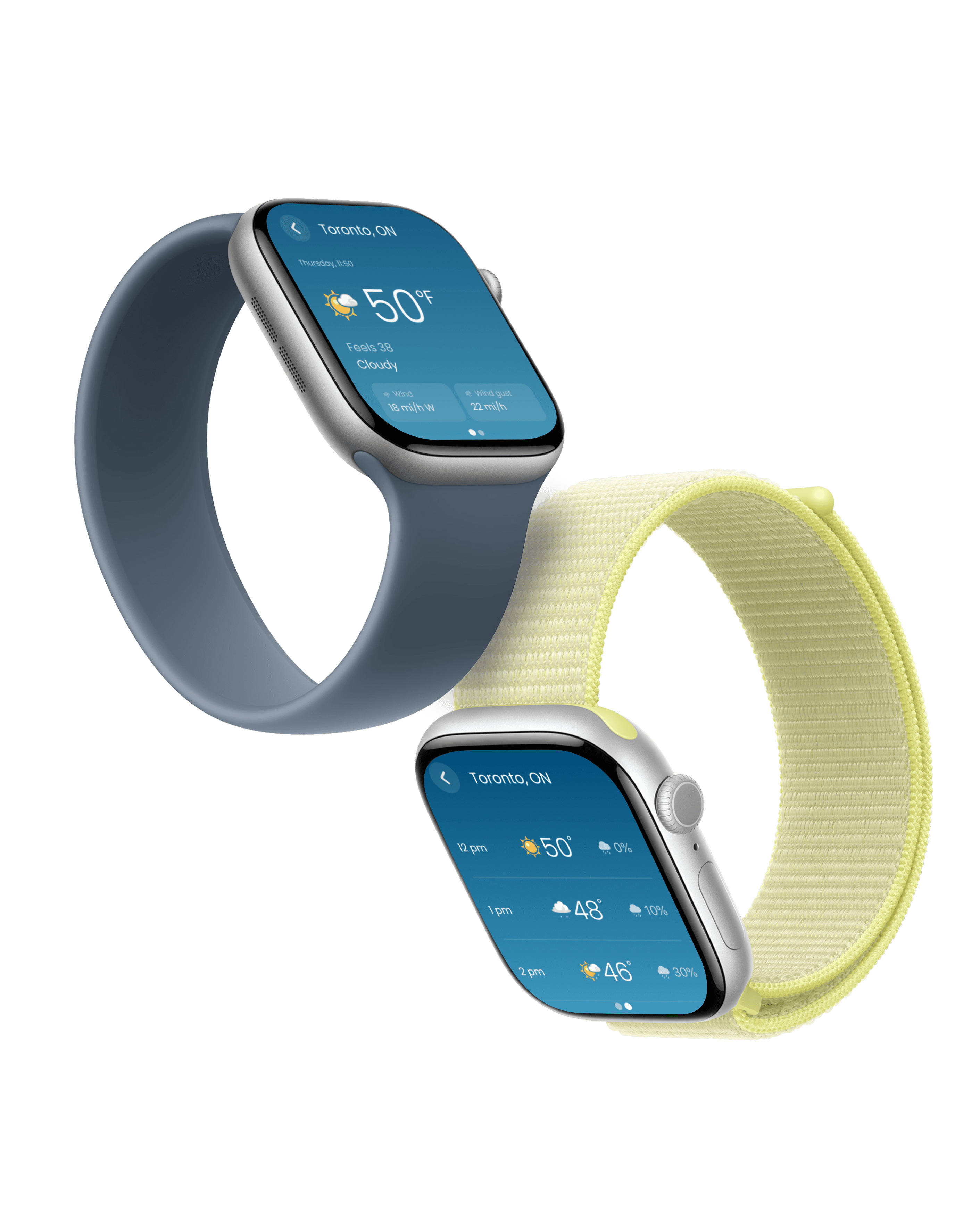
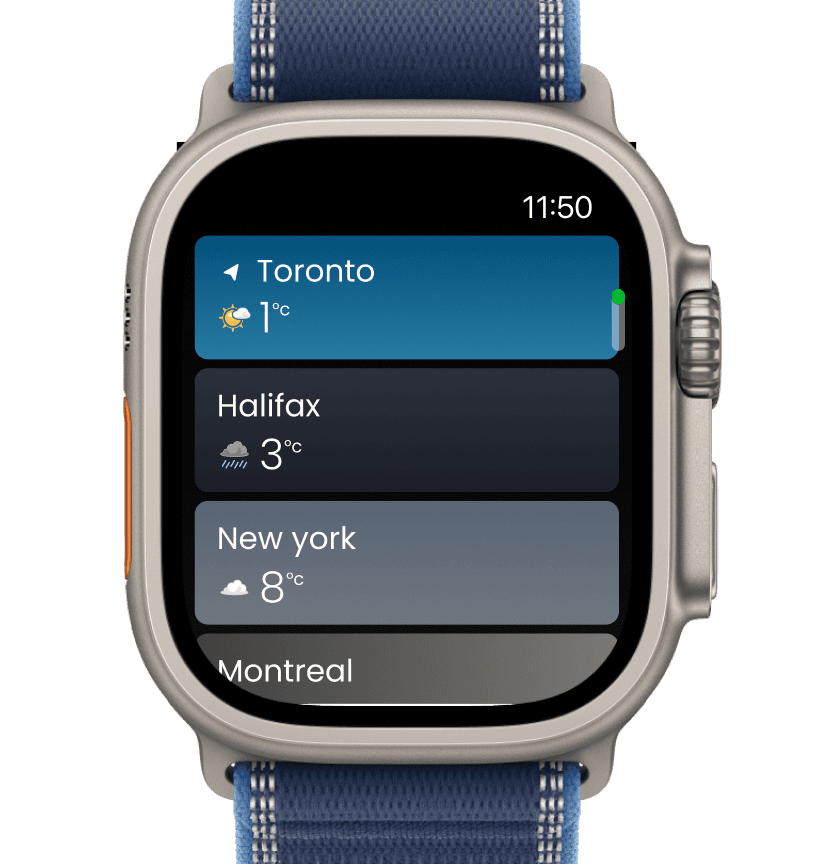
I designed TWN’s watch experience as a glance-first product, not a mini app. We focused on immediate utility over deep exploration.
P0 Glance (Default Screen)
The fastest path to the primary answer: current conditions, next-hour cue, and alert state.
P0 Glance (Default Screen)
The fastest path to the primary answer: current conditions, next-hour cue, and alert state.
One-Gesture Depth
Organized into predictable sections (Now → Next → Later) for a faster mental model.
One-Gesture Depth
Organized into predictable sections (Now → Next → Later) for a faster mental model.
Complications as Entry
Always-on, legible signals that bring users into the app context instantly.
Complications as Entry
Always-on, legible signals that bring users into the app context instantly.
Noise Control
Only showing what matters in the moment to protect user habit and trust.
Noise Control
Only showing what matters in the moment to protect user habit and trust.
outcome
05 . 3
Key Features
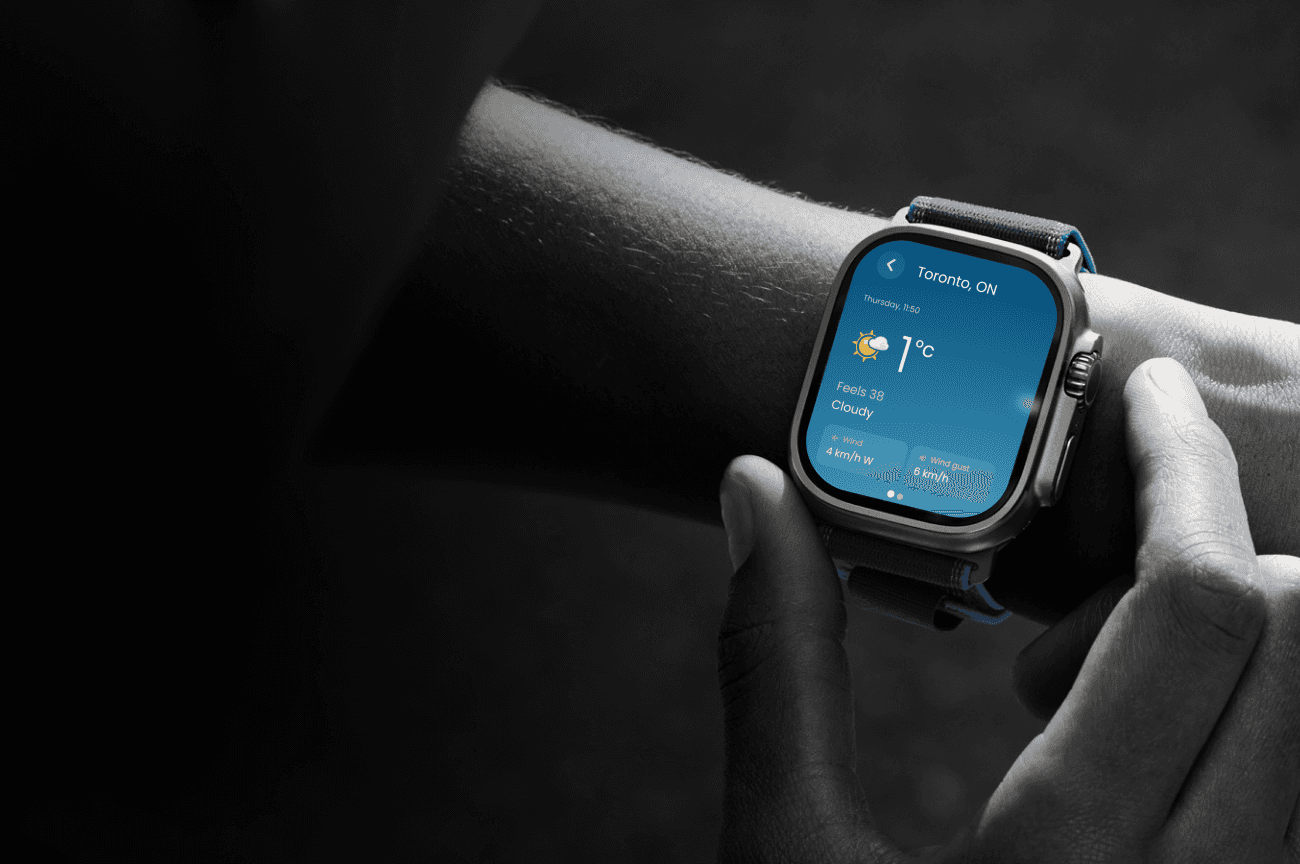
Weather at a glance.
A single screen that shows what matters now location current temperature feels like conditions and wind so users get the answer in seconds with minimal effort.
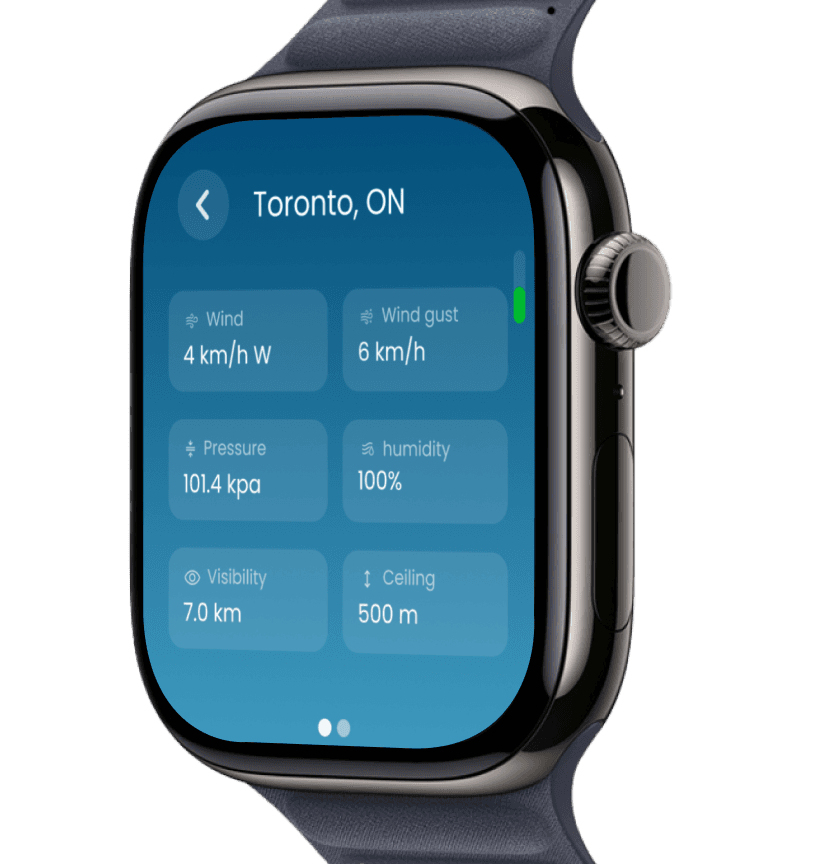
Deeper conditions in one scroll
Designed as a lightweight follow up to the main screen so users can scan secondary metrics fast without digging through menus.
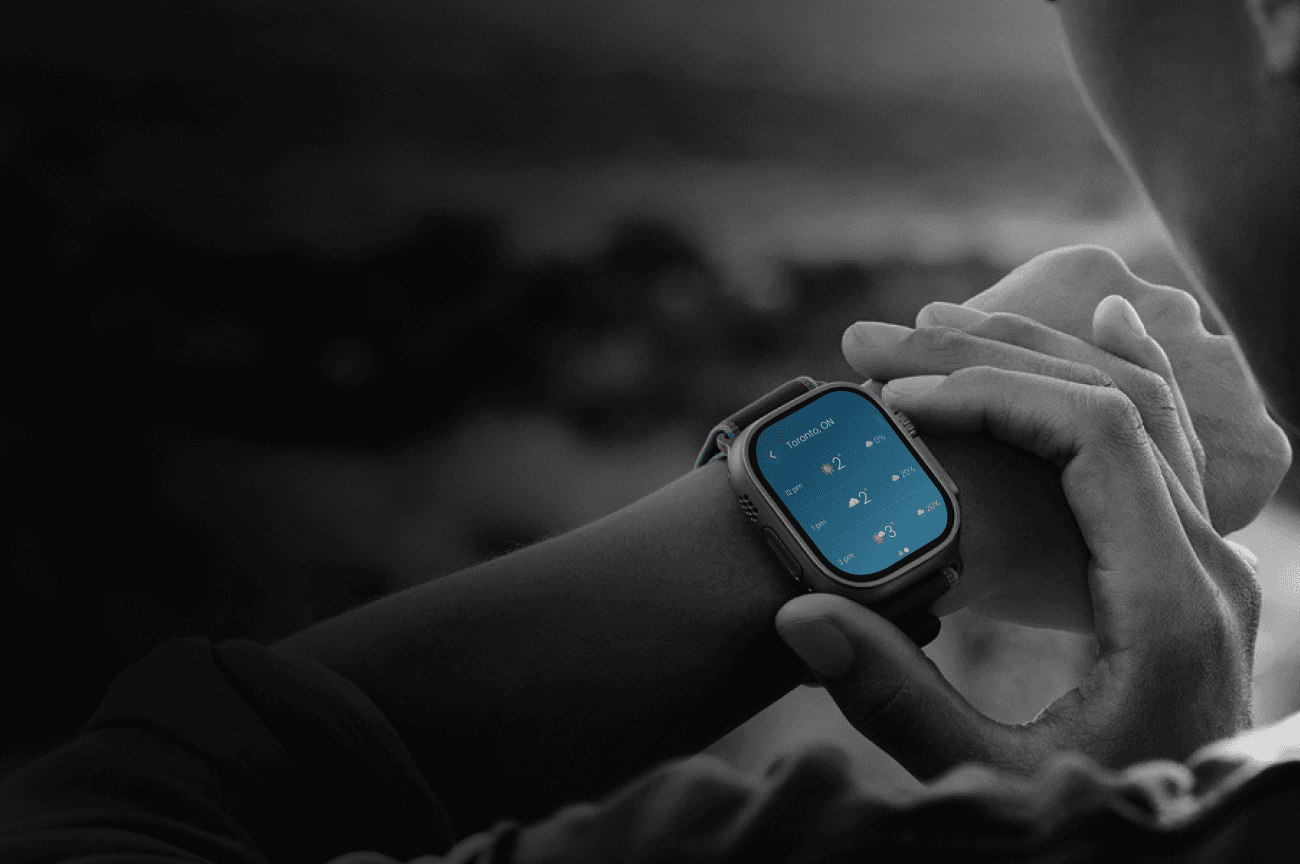
The next hours made clear
Quick hourly snapshots with temperature condition and precipitation chance so users can plan the day in seconds.
Switch locations instantly
Saved locations are designed as large tappable cards so users can move between cities quickly and stay oriented.
06 Impacts & result
Driving ecosystem
engagement.
Adding tablet and watch created new entry points that improved cross-device flow and engagement quality.
48%
Cross-Device Handoff
Watch interactions directly led to iPhone app opens, validating the "Glance as Entry Point" strategy.
48%
Cross-Device Handoff
Watch interactions directly led to iPhone app opens, validating the "Glance as Entry Point" strategy.
1.4X
Session Depth
Users coming from Watch spent 40% more time on mobile, engaging with deeper weather modules.
1.4X
Session Depth
Users coming from Watch spent 40% more time on mobile, engaging with deeper weather modules.
-34%
Friction Reduction
Optimized information architecture allowed users to reach critical data significantly faster across all surfaces.
-34%
Friction Reduction
Optimized information architecture allowed users to reach critical data significantly faster across all surfaces.
+19%
Tablet MAU
Increased ecosystem reach within 60 days of launch.
+19%
Tablet MAU
Increased ecosystem reach within 60 days of launch.
Next Steps
07
Refining the ecosystem.
The next phase focuses on proving impact and iterating where it moves conversion.
Cohorts
Implement deeper tracking to compare Tablet/Watch vs. mobile-only behavior.
Cohorts
Implement deeper tracking to compare Tablet/Watch vs. mobile-only behavior.
A/B Testing
Testing surface-specific entry points to optimize for cross-device handoffs.
A/B Testing
Testing surface-specific entry points to optimize for cross-device handoffs.
Tuning
Fine-tuning complication prompts and alert thresholds based on session frequency.
Tuning
Fine-tuning complication prompts and alert thresholds based on session frequency.
Key Takeaway
05 . 2
Designing across devices is designing across intent.
I designed TWN’s watch experience as a glance-first product, not a mini app. We focused on immediate utility over deep exploration.
Tablet rewards structure.
Designed for scanning deep data, planning ahead, and lean-back exploration.
Tablet rewards structure.
Designed for scanning deep data, planning ahead, and lean-back exploration.
Watch rewards restraint.
Designed for clarity, 3-second glances, and protecting the user's attention.
Watch rewards restraint.
Designed for clarity, 3-second glances, and protecting the user's attention.
A shared system made both feel like TWN without forcing the same UI everywhere.
Thanks For Scrolling.
TWN New Surfaces
Tablet and watch experiences.
Role
Product Designer
Timeline
6-8 Weeks
Impact
35% increase in user retention
Platform
Tablet & WatchOS
SCROLL
TWN New Surfaces
Tablet and watch experiences.
Role
Product Designer
Timeline
6-8 Weeks
Impact
35% increase in user retention
Platform
Tablet & WatchOS
THE STARTING POINT
01
The Challenge
TWN Canada was a mobile-first product with no presence on Apple Watch or Tablet. Users relied on the iPhone app for both quick checks and deep exploration, creating friction across different moments of use. The challenge was to expand TWN across new platforms without fragmenting the experience or duplicating the mobile app. Each device needed a clear, intentional role
Key Constraints
ONE
Uncharted Territory
No existing Watch or Tablet products, meaning usage patterns, success metrics, and content hierarchy had to be defined from scratch
two
High Frequency
Weather is a high-frequency, time-sensitive utility, leaving little tolerance for friction or learning curves
three
Interaction Constraints
Apple Watch interactions are measured in seconds, requiring extreme prioritization and glance-first design
four
Ecosystem Integrity
Ecosystem IntegrityThe Watch experience needed to support mobile usage rather than replace it, avoiding a standalone product that could dilute core engagement
Goals
02
Defining Success
Align fast, low-friction user moments with a multi-device strategy that grows adoption without fragmenting engagement.
User Goals
Effortless Awareness
Access critical weather information faster and with less effort, especially in time-sensitive moments.
Seamless Escalation
Use Apple Watch for quick awareness and the ability to seamlessly continue on mobile when deeper context is needed.
Dedicated Planning
Use Tablet as a dedicated planning surface for comparing forecasts, locations, and timeframes.
Purpose-Built UI
Experience clear, purpose-built interfaces across devices rather than scaled versions of the mobile app.
Business Goals
Ecosystem Entry Point
Establish Apple Watch as an entry point into the mobile ecosystem, increasing high-intent mobile sessions.
Tablet Habituation
Grow the tablet user base by giving tablet users a compelling reason to return and form habits.
Non-Cannibalized Growth
Increase cross-device usage without cannibalizing core mobile engagement.
Platform Dominance
Strengthen TWN’s position as a multi-device weather platform, not just a mobile app.
MY ROLE
03
What I Owned
Experience Architecture
Designed cross-device interaction flows and information hierarchy for Watch, Mobile and Tablet.
Platform Design
Created glance-first Watch interfaces and immersive Tablet layouts tailored to platform behaviors.
Visual Design
Applied consistent visual language and interface components across platforms for clarity and usability.
Collaboration
Worked closely with Product and Engineering to ensure feasibility and smooth handoff of design solutions.
04 The tabLet experience
Tablet is for planning.
Tablet isn’t a bigger phone. It's an atmospheric dashboard.
THE PROBLEM
04 . 1
Stretching the phone feed increased friction
On mobile, vertical feeds work. On tablet, that same pattern breaks the experience: it creates more movement but not more clarity.
Too much vertical travel
Key modules (hourly, radar, alerts) were buried behind long, exhausting scrolls.
Weaker hierarchy
Everything looked the same size. Users had to read more to understand what mattered.
Context loss
As users scrolled, they lost track of time, location, and orientation within the app.
Poor use of space
Wide layouts behaved like single-column feeds, making the screen feel empty and slow.
outcome
04 . 1
A dashboard built for scanning.
Instead of scaling up the mobile feed, I redesigned the tablet experience around a scan-first dashboard for instant clarity.
Dashboard structure
Supports scanning across modules horizontally and vertically rather than just reading down.
Clear grouping
Organized into predictable sections (Now → Next → Later) for a faster mental model.
Module priority
Critical data stays prominent; secondary modules stay accessible without competing.
Persistent context
Kept time and location anchored so users never lose orientation while exploring.
outcome
04 . 1
Key Features
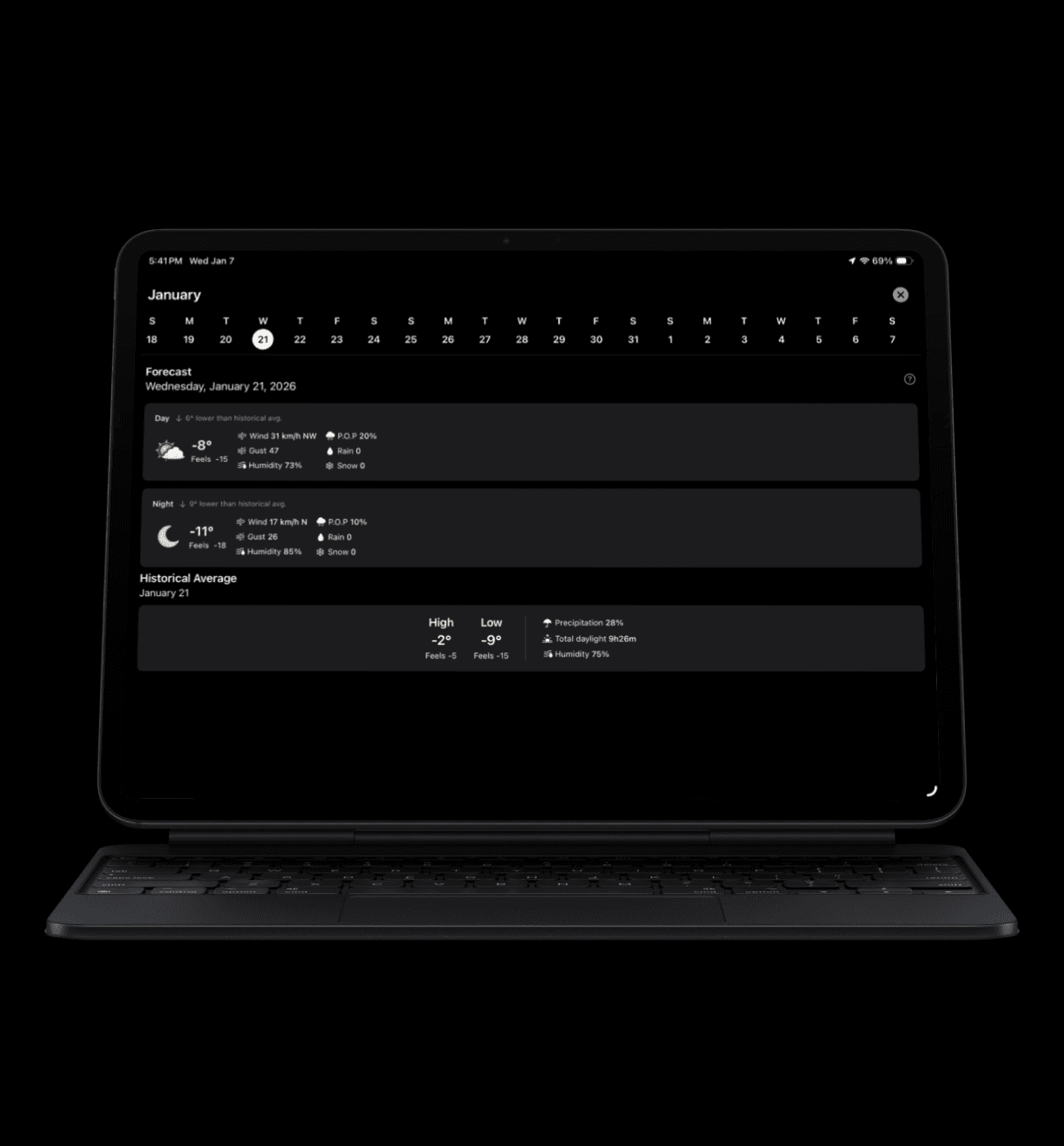
Scan-first layout, built for tablet.
A two-column dashboard in portrait makes the forecast easier to skim. In landscape, the left drawer stays open with the location list—so users can switch places without losing context.
Alerts, always in view.
Alerts live inside the location list, so urgency is visible where users already navigate. In landscape, the alert state stays persistent making it easy to monitor conditions while exploring the forecast.
Maps made for the bigger screen.
A dedicated maps experience for radar, precipitation, highway conditions, wind, and clouds designed to take advantage of tablet space for clearer layers, quicker scanning, and better situational awareness.
More depth, not more noise.
Tablet unlocks a wider, more detailed forecast view showing more of what matters at once while keeping hierarchy clean, readable, and easy to compare across timeframes.
05 The WATCH experience
Watch is for micro-moments
People check watch weather to decide fast not browse.
THE PROBLEM
05 . 1
Watch isn’t a small phone
On watch, attention is limited and sessions are short. If we tried to bring mobile-style richness onto the wrist, the experience would become friction:
Cognitive Overload
Too much reading before getting an answer leads to mental friction.
High Interaction Cost
Too many taps for basic questions like “is it going to rain soon?”
Information Noise
Important signals competing with nice-to-have data metrics.
Friction Cycles
If the experience isn’t instant, users won’t build a daily habit.
outcome
05 . 2
A glance-first watch experience (built from scratch)
I designed TWN’s watch experience as a glance-first product, not a mini app. We focused on immediate utility over deep exploration.
P0 Glance (Default Screen)
The fastest path to the primary answer: current conditions, next-hour cue, and alert state.
One-Gesture Depth
Organized into predictable sections (Now → Next → Later) for a faster mental model.
Complications as Entry
Always-on, legible signals that bring users into the app context instantly.
Noise Control
Only showing what matters in the moment to protect user habit and trust.
outcome
05 . 3
Key Features
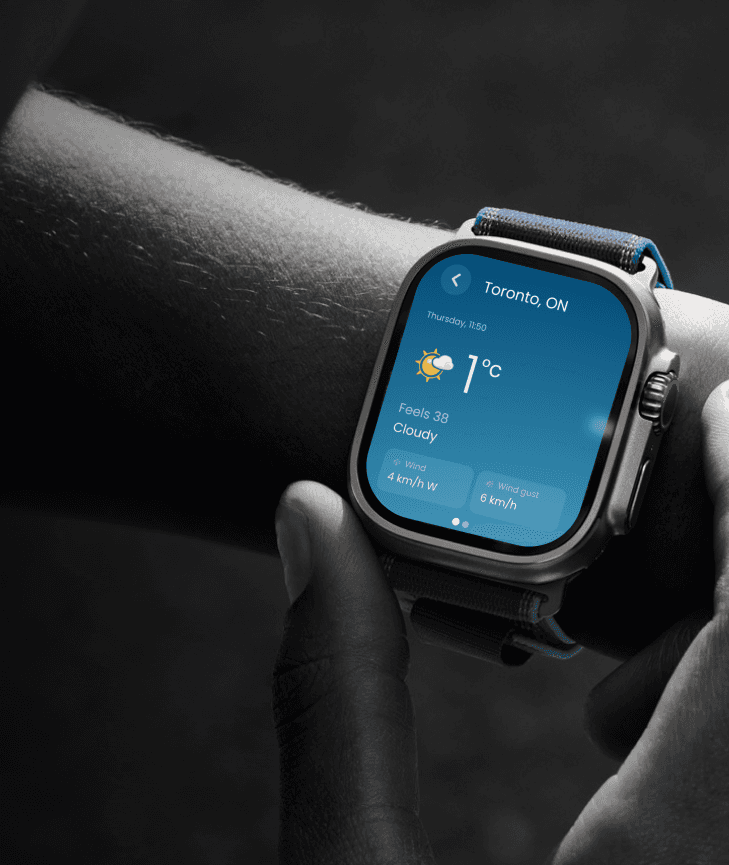
Weather at a glance.
A single screen that shows what matters now location current temperature feels like conditions and wind so users get the answer in seconds with minimal effort.
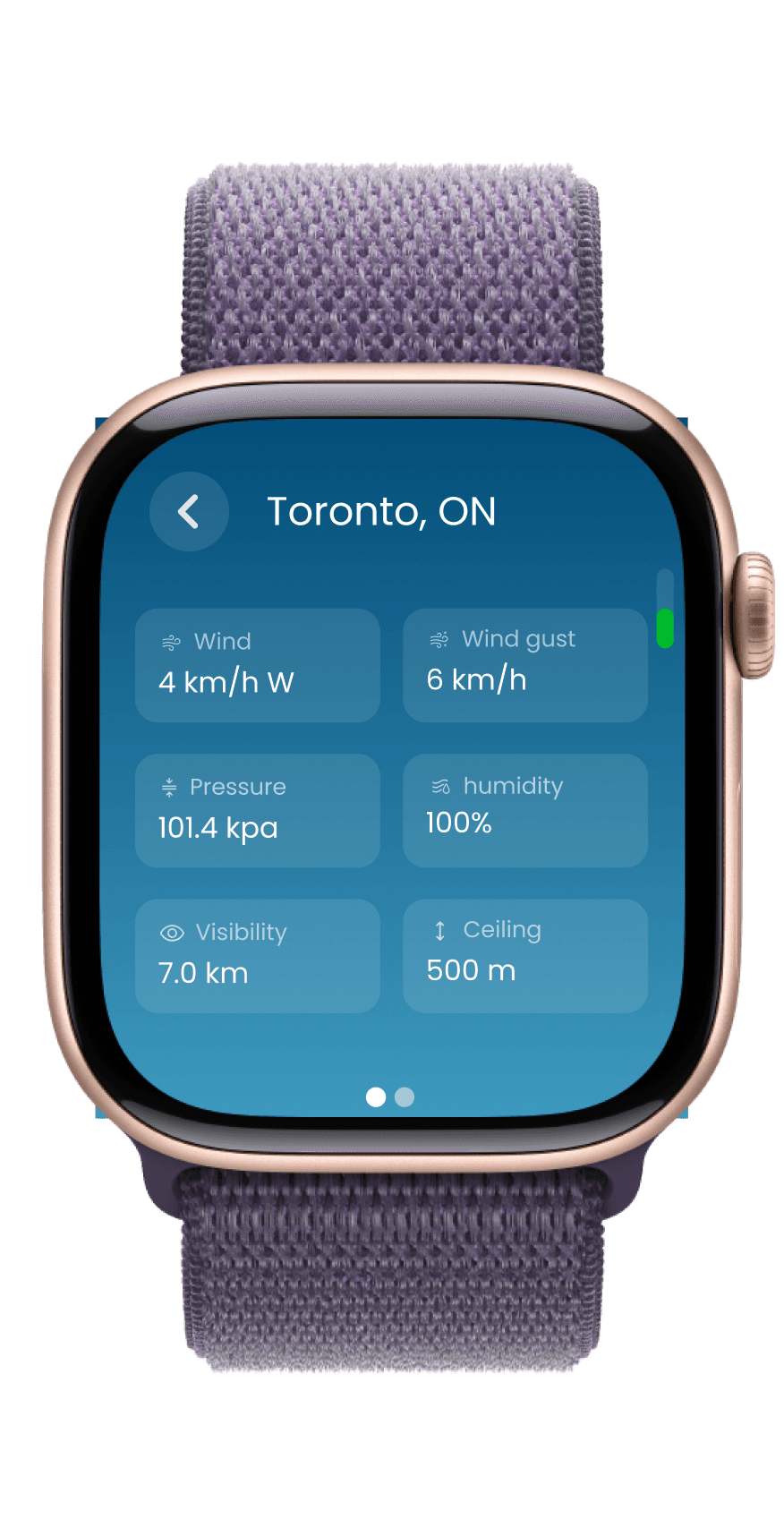
Deeper conditions in one scroll
Designed as a lightweight follow up to the main screen so users can scan secondary metrics fast without digging through menus.
The next hours made clear
Quick hourly snapshots with temperature condition and precipitation chance so users can plan the day in seconds.
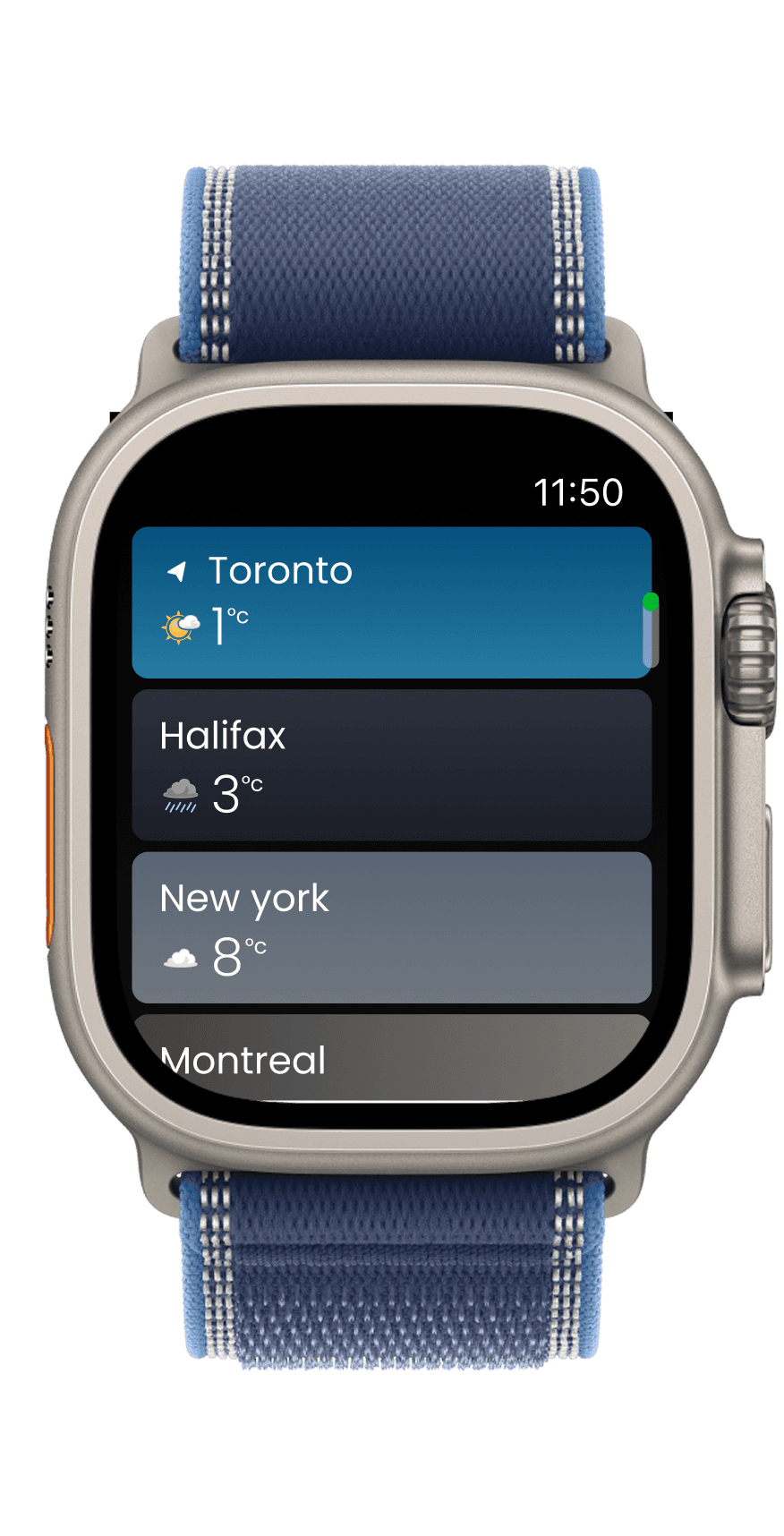
Switch locations instantly
Saved locations are designed as large tappable cards so users can move between cities quickly and stay oriented.
06 Impacts & result
Driving ecosystem
engagement.
Adding tablet and watch created new entry points that improved cross-device flow and engagement quality.
48%
Cross-Device Handoff
Watch interactions directly led to iPhone app opens, validating the "Glance as Entry Point" strategy.
1.4X
Session Depth
Users coming from Watch spent 40% more time on mobile, engaging with deeper weather modules.
-34%
Friction Reduction
Optimized information architecture allowed users to reach critical data significantly faster across all surfaces.
+19%
Tablet MAU
Increased ecosystem reach within 60 days of launch.
Next Steps
07
Refining the ecosystem.
The next phase focuses on proving impact and iterating where it moves conversion.
Cohorts
Implement deeper tracking to compare Tablet/Watch vs. mobile-only behavior.
A/B Testing
Testing surface-specific entry points to optimize for cross-device handoffs.
Tuning
Fine-tuning complication prompts and alert thresholds based on session frequency.
Key Takeaway
05 . 2
Designing across devices is designing across intent.
I designed TWN’s watch experience as a glance-first product, not a mini app. We focused on immediate utility over deep exploration.
Tablet rewards structure.
Designed for scanning deep data, planning ahead, and lean-back exploration.
Watch rewards restraint.
Designed for clarity, 3-second glances, and protecting the user's attention.
A shared system made both feel like TWN without forcing the same UI everywhere.
Thanks For Scrolling.
TWN New Surfaces
Tablet and watch experiences.
Role
Product Designer
Timeline
6-8 Weeks
Impact
35% increase in user retention
Platform
Tablet & WatchOS
SCROLL
TWN New Surfaces
Tablet and watch experiences.
Role
Product Designer
Timeline
6-8 Weeks
Impact
35% increase in user retention
Platform
Tablet & WatchOS
THE STARTING POINT
01
The Challenge
TWN Canada was a mobile-first product with no presence on Apple Watch or Tablet. Users relied on the iPhone app for both quick checks and deep exploration, creating friction across different moments of use. The challenge was to expand TWN across new platforms without fragmenting the experience or duplicating the mobile app. Each device needed a clear, intentional role
Key Constraints
ONE
Uncharted Territory
No existing Watch or Tablet products, meaning usage patterns, success metrics, and content hierarchy had to be defined from scratch
two
High Frequency
Weather is a high-frequency, time-sensitive utility, leaving little tolerance for friction or learning curves
three
Interaction Constraints
Apple Watch interactions are measured in seconds, requiring extreme prioritization and glance-first design
four
Ecosystem Integrity
Ecosystem IntegrityThe Watch experience needed to support mobile usage rather than replace it, avoiding a standalone product that could dilute core engagement
Goals
02
Defining Success
Align fast, low-friction user moments with a multi-device strategy that grows adoption without fragmenting engagement.
User Goals
Effortless Awareness
Access critical weather information faster and with less effort, especially in time-sensitive moments.
Seamless Escalation
Use Apple Watch for quick awareness and the ability to seamlessly continue on mobile when deeper context is needed.
Dedicated Planning
Use Tablet as a dedicated planning surface for comparing forecasts, locations, and timeframes.
Purpose-Built UI
Experience clear, purpose-built interfaces across devices rather than scaled versions of the mobile app.
Business Goals
Ecosystem Entry Point
Establish Apple Watch as an entry point into the mobile ecosystem, increasing high-intent mobile sessions.
Tablet Habituation
Grow the tablet user base by giving tablet users a compelling reason to return and form habits.
Non-Cannibalized Growth
Increase cross-device usage without cannibalizing core mobile engagement.
Platform Dominance
Strengthen TWN’s position as a multi-device weather platform, not just a mobile app.
MY ROLE
03
What I Owned
Experience Architecture
Designed cross-device interaction flows and information hierarchy for Watch, Mobile and Tablet.
Platform Design
Created glance-first Watch interfaces and immersive Tablet layouts tailored to platform behaviors.
Visual Design
Applied consistent visual language and interface components across platforms for clarity and usability.
Collaboration
Worked closely with Product and Engineering to ensure feasibility and smooth handoff of design solutions.
04 The tabLet experience
Tablet is for planning.
Tablet isn’t a bigger phone. It's an atmospheric dashboard.
THE PROBLEM
04 . 1
Stretching the phone feed increased friction
On mobile, vertical feeds work. On tablet, that same pattern breaks the experience: it creates more movement but not more clarity.
Too much vertical travel
Key modules (hourly, radar, alerts) were buried behind long, exhausting scrolls.
Weaker hierarchy
Everything looked the same size. Users had to read more to understand what mattered.
Context loss
As users scrolled, they lost track of time, location, and orientation within the app.
Poor use of space
Wide layouts behaved like single-column feeds, making the screen feel empty and slow.
outcome
04 . 1
A dashboard built for scanning.
Instead of scaling up the mobile feed, I redesigned the tablet experience around a scan-first dashboard for instant clarity.
Dashboard structure
Supports scanning across modules horizontally and vertically rather than just reading down.
Clear grouping
Organized into predictable sections (Now → Next → Later) for a faster mental model.
Module priority
Critical data stays prominent; secondary modules stay accessible without competing.
Persistent context
Kept time and location anchored so users never lose orientation while exploring.
outcome
04 . 1
Key Features
Scan-first layout, built for tablet.
A two-column dashboard in portrait makes the forecast easier to skim. In landscape, the left drawer stays open with the location list—so users can switch places without losing context.
Alerts, always in view.
Alerts live inside the location list, so urgency is visible where users already navigate. In landscape, the alert state stays persistent making it easy to monitor conditions while exploring the forecast.
Maps made for the bigger screen.
A dedicated maps experience for radar, precipitation, highway conditions, wind, and clouds designed to take advantage of tablet space for clearer layers, quicker scanning, and better situational awareness.
More depth, not more noise.
Tablet unlocks a wider, more detailed forecast view showing more of what matters at once while keeping hierarchy clean, readable, and easy to compare across timeframes.
05 The WATCH experience
Watch is for micro-moments
People check watch weather to decide fast not browse.
THE PROBLEM
05 . 1
Watch isn’t a small phone
On watch, attention is limited and sessions are short. If we tried to bring mobile-style richness onto the wrist, the experience would become friction:
Cognitive Overload
Too much reading before getting an answer leads to mental friction.
High Interaction Cost
Too many taps for basic questions like “is it going to rain soon?”
Information Noise
Important signals competing with nice-to-have data metrics.
Friction Cycles
If the experience isn’t instant, users won’t build a daily habit.
outcome
05 . 2
A glance-first watch experience (built from scratch)
I designed TWN’s watch experience as a glance-first product, not a mini app. We focused on immediate utility over deep exploration.
P0 Glance (Default Screen)
The fastest path to the primary answer: current conditions, next-hour cue, and alert state.
One-Gesture Depth
Organized into predictable sections (Now → Next → Later) for a faster mental model.
Complications as Entry
Always-on, legible signals that bring users into the app context instantly.
Noise Control
Only showing what matters in the moment to protect user habit and trust.
outcome
05 . 3
Key Features
Weather at a glance.
A single screen that shows what matters now location current temperature feels like conditions and wind so users get the answer in seconds with minimal effort.
Deeper conditions in one scroll
Designed as a lightweight follow up to the main screen so users can scan secondary metrics fast without digging through menus.
The next hours made clear
Quick hourly snapshots with temperature condition and precipitation chance so users can plan the day in seconds.
Switch locations instantly
Saved locations are designed as large tappable cards so users can move between cities quickly and stay oriented.
06 Impacts & result
Driving ecosystem
engagement.
Adding tablet and watch created new entry points that improved cross-device flow and engagement quality.
48%
Cross-Device Handoff
Watch interactions directly led to iPhone app opens, validating the "Glance as Entry Point" strategy.
1.4X
Session Depth
Users coming from Watch spent 40% more time on mobile, engaging with deeper weather modules.
-34%
Friction Reduction
Optimized information architecture allowed users to reach critical data significantly faster across all surfaces.
+19%
Tablet MAU
Increased ecosystem reach within 60 days of launch.
Next Steps
07
Refining the ecosystem.
The next phase focuses on proving impact and iterating where it moves conversion.
Cohorts
Implement deeper tracking to compare Tablet/Watch vs. mobile-only behavior.
A/B Testing
Testing surface-specific entry points to optimize for cross-device handoffs.
Tuning
Fine-tuning complication prompts and alert thresholds based on session frequency.
Key Takeaway
05 . 2
Designing across devices is designing across intent.
I designed TWN’s watch experience as a glance-first product, not a mini app. We focused on immediate utility over deep exploration.
Tablet rewards structure.
Designed for scanning deep data, planning ahead, and lean-back exploration.
Watch rewards restraint.
Designed for clarity, 3-second glances, and protecting the user's attention.
A shared system made both feel like TWN without forcing the same UI everywhere.
Thanks For Scrolling.